Spotter Location3.1
Publisher Description


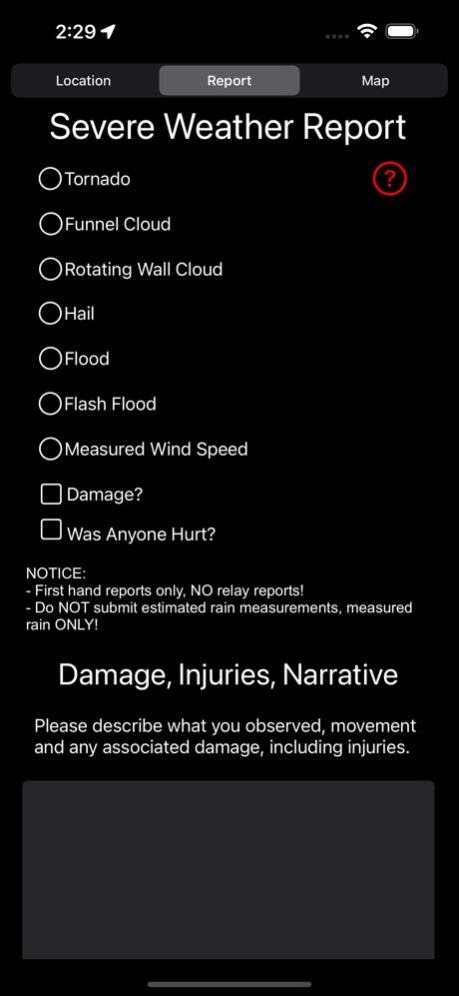

Spotter Location allows storm spotters and storm chasers out in the field to track their location. Spotter Location integrates with the Spotter Network API. This integration allows location coordinates to be uploaded to Spotter Network, and for storm spotters or storm chasers to submit Severe Storm Reports directly from the Spotter Location.
Version History Combined maps so spotter and reports show all on one map now. 3.1 04/28/2025 - Minor fix where Severe Weather Report was not showing the report time in the devices current time zone, but was still showing the report in UTC time. 3.0.1 04/18/2025 - Added radar to maps and you can toggle it on/off
- Optimized code and bug fixes 3.0 04/17/2025 Added feature to display current location on the Spotter and Reports maps. 2.4 03/19/2025 Bug fixes 2.3 05/08/2024 Fixed bug where map would not load spotters or storm reports if the Spotter Network API has latency due to high spotter traffic. 2.2 04/03/2024 Updated main buttons on location reporting screen. 2.1 12/11/2023 Added maps where you can see other spotters on Spotter Network and another map to display Weather Reports. Also fixed some minor bugs. 2.0 12/27/2022 - Updated Weather Report to use radio buttons instead of switches
- Added info button for what criteria must be included for the Weather Report
- Displays a status for when your location was uploaded to Spotter Network rather than displaying the API response
- Updated button color to be more clear 1.1 10/23/2022 1.0 06/08/2022
About Spotter Location
The company that develops Spotter Location is Randal Jennings. The latest version released by its developer is 3.1.
To install Spotter Location on your iOS device, just click the green Continue To App button above to start the installation process. The app is listed on our website since 2026-10-15 and was downloaded 7 times. We have already checked if the download link is safe, however for your own protection we recommend that you scan the downloaded app with your antivirus. Your antivirus may detect the Spotter Location as malware if the download link is broken.
How to install Spotter Location on your iOS device:
- Click on the Continue To App button on our website. This will redirect you to the App Store.
- Once the Spotter Location is shown in the iTunes listing of your iOS device, you can start its download and installation. Tap on the GET button to the right of the app to start downloading it.
- If you are not logged-in the iOS appstore app, you'll be prompted for your your Apple ID and/or password.
- After Spotter Location is downloaded, you'll see an INSTALL button to the right. Tap on it to start the actual installation of the iOS app.
- Once installation is finished you can tap on the OPEN button to start it. Its icon will also be added to your device home screen.
Program Details
System requirements
Download information
Pricing
Version History
version 3.1
posted on 2026-10-15
Version History Combined maps so spotter and reports show all on one map now. 3.1 04/28/2025 - Minor fix where Severe Weather Report was not showing the report time in the devices current time zone, but was still showing the report in UTC time. 3.0.1 04/18/2025 - Added radar to maps and you can toggle it on/off
- Optimized code and bug fixes 3.0 04/17/2025 Added feature to display current location on the Spotter and Reports maps. 2.4 03/19/2025 Bug fixes 2.3 05/08/2024 Fixed bug where map would not load spotters or storm reports if the Spotter Network API has latency due to high spotter traffic. 2.2 04/03/2024 Updated main buttons on location reporting screen. 2.1 12/11/2023 Added maps where you can see other spotters on Spotter Network and another map to display Weather Reports. Also fixed some minor bugs. 2.0 12/27/2022 - Updated Weather Report to use radio buttons instead of switches
- Added info button for what criteria must be included for the Weather Report
- Displays a status for when your location was uploaded to Spotter Network rather than displaying the API response
- Updated button color to be more clear 1.1 10/23/2022 1.0 06/08/2022
version 3.1
posted on 2025-04-28
Combined maps so spotter and reports show all on one map now.
version 3.1
posted on 2025-04-28
Apr 28, 2025
Version 3.1
Combined maps so spotter and reports show all on one map now.
version 3.0.1
posted on 2025-04-18
Apr 18, 2025
Version 3.0.1
- Minor fix where Severe Weather Report was not showing the report time in the devices current time zone, but was still showing the report in UTC time.
version 2.4
posted on 2025-03-19
Mar 19, 2025
Version 2.4
Added feature to display current location on the Spotter and Reports maps.
version 2.3
posted on 2024-05-08
May 8, 2024
Version 2.3
Bug fixes
version 2.2
posted on 2024-04-03
Apr 3, 2024
Version 2.2
Fixed bug where map would not load spotters or storm reports if the Spotter Network API has latency due to high spotter traffic.
version 2.1
posted on 2023-12-11
Dec 11, 2023
Version 2.1
Updated main buttons on location reporting screen.
version 2.0
posted on 2022-12-27
Dec 27, 2022
Version 2.0
Added maps where you can see other spotters on Spotter Network and another map to display Weather Reports. Also fixed some minor bugs.
